
This article explains how Automated Clearing House (ACH) payments work in Design Flex and what to expect when customers pay using a US bank account. ACH payments are completed through a Payment Request Link and cannot be processed manually in the Merchant Portal.
Before you begin
- ACH must be enabled on your account.
- ACH payments are supported only through a Payment Request Link.
- Products or services must not be provided until funds are deposited.
How customers pay using ACH
- Send a Payment Request Link to your customer.
- The customer opens the link and selects US Bank Account as the payment method.
- The customer enters their email address and full name.
- The customer selects their bank from the list or searches for it.
- If the bank supports Instant Bank Verification, the customer signs in through their bank’s login screen.
- Once the bank account is connected, the customer completes the payment.
Important notes
- Customers cannot manually enter routing and account numbers.
- If a bank does not support instant verification, the customer must choose another bank or pay by card.
- Successfully cleared ACH payments appear as Succeeded in the Merchant Portal.
Viewing ACH payment details
Designers can view ACH transactions in the Merchant Portal.
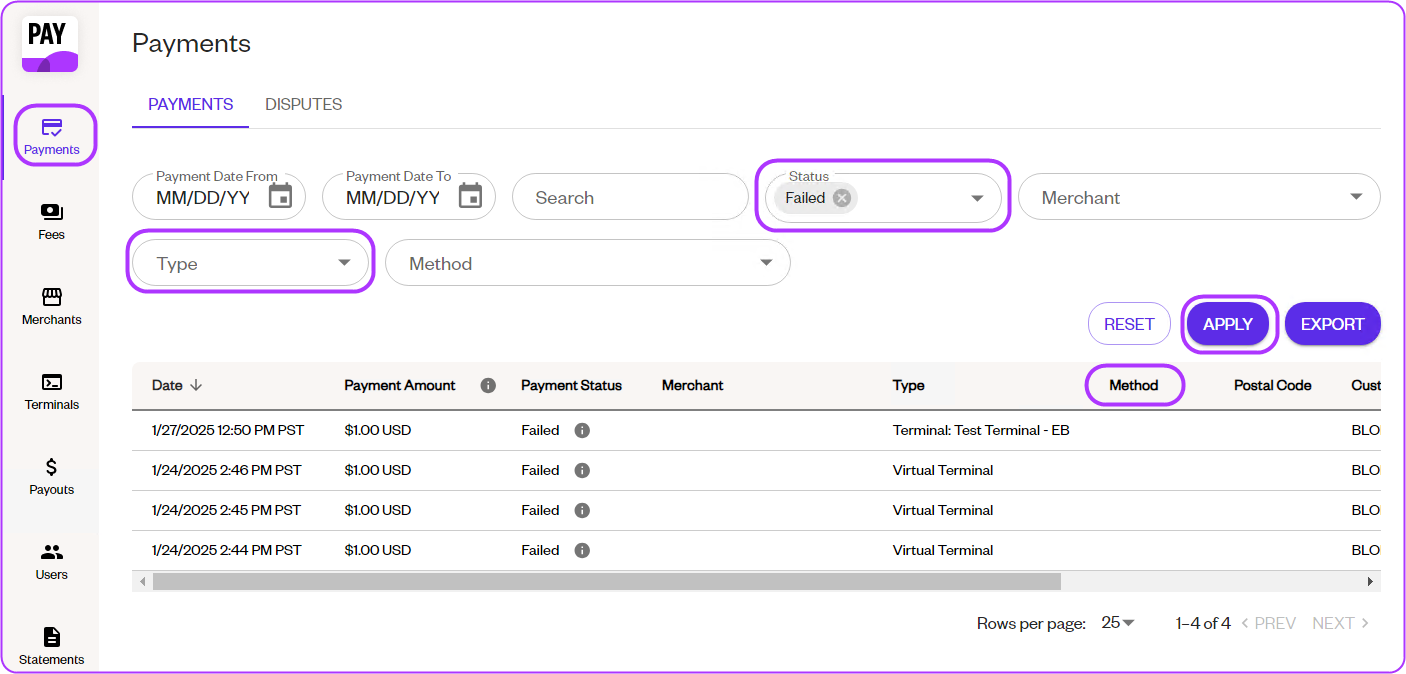
Each ACH payment shows one of the following statuses:
Pending
- The payment is processing and has not yet cleared the bank.
- Pending payments do not appear in the Payouts section.
Succeeded
- The ACH payment has successfully cleared the bank.
- The payment appears in Payments and is included in Payouts.
- Designers should only deliver products or services once the status is Succeeded.
Failed
- The ACH payment was declined or returned.
- Failed payments never appear in Payouts.
- Designers may notice discrepancies during reconciliation and should review the Payments list to confirm the failure.
ACH fees
- 0.50% per transaction
- $25.00 dispute fee
- $10.00 ACH return fee
Funding timelines
- Deposits typically take 1–4 business days.
- In some cases, settlement may take up to 8 days.
- Review the Merchant Portal regularly for failed transactions.
Rules and regulations
ACH processing rules are governed by the National Automated Clearing House Association (NACHA).
Designers are responsible for:
- Understanding current ACH rules
- Ensuring proper customer authorization
- Complying with all applicable ACH regulations
ACH rules may change over time, so ongoing awareness is required.
Disputes and refunds
ACH disputes differ from credit card disputes:
- All ACH Direct Debit disputes are final
- There is no appeal process
If a customer successfully disputes a payment, the designer must contact the customer directly to resolve the issue
Warning: If a designer issues a refund while the customer’s bank also processes a dispute, the customer may receive two credits for the same transaction.